爱意满满的作品展示区。
deep89381
0D

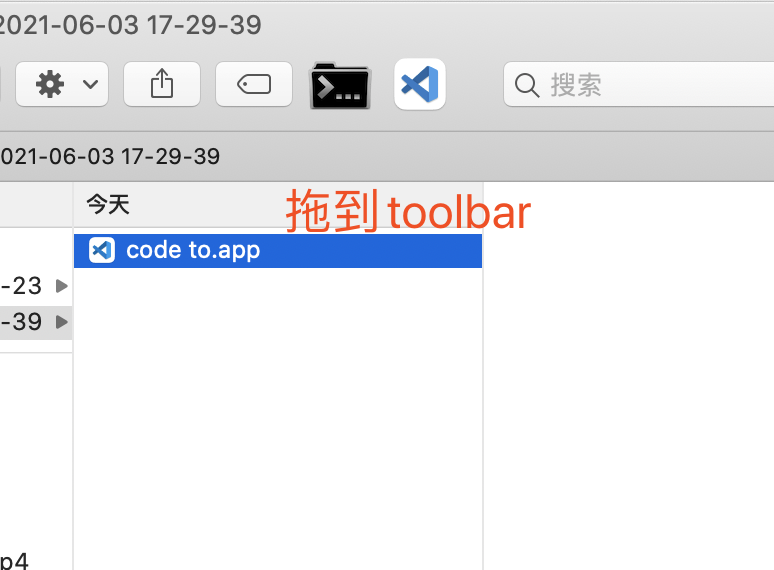
好货分享, 在 toolbar 上一键 vscode 打开当前 Finder 文件夹

  •  
  •   deep89381 · Jun 3, 2021 · 2579 views
    This topic created in 1826 days ago, the information mentioned may be changed or developed.

    [传送门] ( https://github.com/zhuifeng1017/cdto/raw/master/dist/code%20to.app.zip)

    1. 确保code已经 install 到系统 PATH
    2. 按住 command 键,选中code to.app拖到 toolbar


    7 replies    2021-06-04 10:31:34 +08:00
    darksword21
        1
    darksword21  
    PRO
       Jun 3, 2021
    touchbar 就够垃圾了,在加个垃圾 finder

    难道这就是 -- = + 吗
    darksword21
        2
    darksword21  
    PRO
       Jun 3, 2021   ❤️ 2
    擦, 是 toolbar 原谅我看错了, 跑了 )
    deep89381
        3
    deep89381  
    OP
       Jun 3, 2021   ❤️ 1
    @darksword21 小伙眼神不太好,最近熬夜太多吧
    nondanee
        4
    nondanee  
       Jun 3, 2021 via Android
    zhs227
        5
    zhs227  
       Jun 3, 2021
    以前用 cd to,后面发现 cd to 里推荐了 `https://github.com/Ji4n1ng/OpenInTerminal`,再后面就一直用这个。感觉非常好用,不管是打开 terminal 还是开 vscode,都可以解决。
    deep89381
        6
    deep89381  
    OP
       Jun 3, 2021
    @nondanee 擦,原来早就有了....
    不过,还是终究还是自己造的轮子香 [呲牙]
    DoodleSit
        7
    DoodleSit  
       Jun 4, 2021
    支持老铁~
    About   ·   Help   ·   Advertise   ·   Blog   ·   API   ·   FAQ   ·   Solana   ·   3227 Online   Highest 6679   ·     Select Language
    创意工作者们的社区
    World is powered by solitude
    VERSION: 93c8b4a0 · 50ms · UTC 12:54 · PVG 20:54 · LAX 05:54 · JFK 08:54
    ♥ Do have faith in what you're doing.