
多功能菜单插件 SelectMenu v2.0 发布了,插件更新内容:
- 增加屏幕边缘自动判断
- 增加菜单打开的状态下,浏览器滚动检测边缘超出的处理
- 移除多余 jQuery 表达式
- 优化插件性能
- 修复部分情况下对象出现错误的问题
- 修复部分情况下,菜单弹出位置不正确的问题
- 增加 searchField 字段,在高级菜单模式中,允许设置具体搜索的字段,而不默认使用 showField 字段
- 增加 $.fn.selectMenuHide() 的 API,用于关闭菜单
- 增加 $.fn.selectMenuClear() 的 API,用于清空高级菜单模式下的所有选中项目
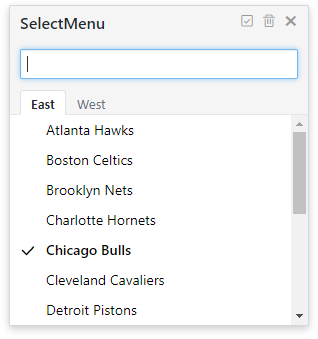
- 增加 eTabSwitch 事件回调,用于在高级菜单模式且使用分组数据的情况下,响应分类( Tab )切换的事件回调
- 增加多级菜单支持,理论上支持无限级别
- 增加少量动画效果
插件简介

简洁、易用、多样的菜单解决方案
插件状态


入门指南、实例、文档
更多实例、文档请访问:
项目 GitHub 地址:SelectMenu
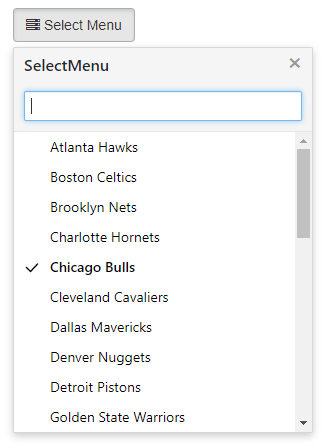
插件效果预览:
常规菜单模式

高级菜单模式
高级菜单模式 (多分组数据)
安装 / 下载
download SelectMenu plugin zip file by last release, or click me to download SelectMenu
or use NPM
npm install selectmenu
使用手册
插件文件引用
<!-- Basic environment reference -->
<!-- jQuery library include -->
<script type="text/javascript" src="jquery.min.js" >< /script>

<!-- SelectMenu style sheet -->
<link rel="stylesheet" href="selectmenu.css" type="text/css">

<!-- SelectMenu plugin js file include -->
<script type="text/javascript" src="selectmenu.js" >< /script>
HTML 元素设置
<!--
Set the trigger menu to open the object, where
only the most commonly used button as an example
-->
<button type="button" id="btnDemo">Select Menu</button>
Javascript 初始化
//defined data source
//data format:Array[{Object},{...}]
var data = [
    {id:1 ,name:'Chicago Bulls',desc:'芝加哥公牛'},
    {id:2 ,name:'Cleveland Cavaliers',desc:'克里夫兰骑士'},
    {id:3 ,name:'Detroit Pistons',desc:'底特律活塞'},
    {id:4 ,name:'Indiana Pacers',desc:'印第安纳步行者'}
];
//initialize selectmenu
$('#btnDemo').selectMenu({
    showField : 'desc',
    keyField : 'id',
    data : data
});


 Select Language