deep89381
0D

分享个 vscode 好工具,一键 vscode 到当前 Finder 文件夹, 拿走不谢!

  •  
  •   deep89381 · Jun 3, 2021 · 4970 views
    This topic created in 1826 days ago, the information mentioned may be changed or developed.

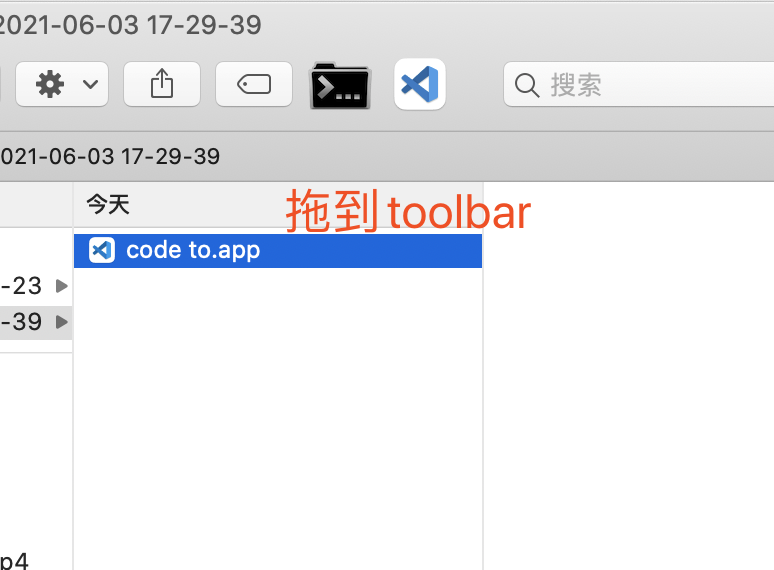
    在 toolbar 上一键 vscode 打开当前文件夹 传送门下载>>

    1. 确保code已经 install 到系统 PATH
    2. 按住 command 键,选中code to.app拖到 toolbar


    10 replies    2021-06-04 16:14:35 +08:00
    chenyg32
        1
    chenyg32  
       Jun 3, 2021   ❤️ 1
    赞👍。
    虽然我一般很少用 Finder 了,都是命令行 `code .`; Finder 下我是直接拖到 Docker 上的 VSCode 图标上
    deep89381
        2
    deep89381  
    OP
       Jun 3, 2021
    @chenyg32 没写这个工具之前,我也是这么用的[呲牙]
    quzard
        3
    quzard  
       Jun 3, 2021
    store 里有个超级右键的 app,可以实现这个功能,更强大
    ynyounuo
        4
    ynyounuo  
       Jun 3, 2021
    ynyounuo
        5
    ynyounuo  
       Jun 3, 2021
    kuunnnn
        6
    kuunnnn  
       Jun 3, 2021
    这个可以用 applescript 实现,代码导出为 app, 然后拖到 finder 工具栏
    yemoluo
        7
    yemoluo  
       Jun 3, 2021
    @chenyg32 你有没有发现,命令行 code 有时候会打印好多日志,污染命令行
    zhch602
        8
    zhch602  
       Jun 4, 2021
    推荐 utools,比你这个更方便
    vinsa
        9
    vinsa  
       Jun 4, 2021
    1. 把 VSCode 拖拽到 toolbar
    2. 把需要打开的 folder 拖拽到 VSCode icon 上

    是不是就是相同效果?啥也不用装
    chenyg32
        10
    chenyg32  
       Jun 4, 2021
    @GTim 没有,`code 目标目录`,直接就打开了。不太明白是怎么污染
    About   ·   Help   ·   Advertise   ·   Blog   ·   API   ·   FAQ   ·   Solana   ·   3227 Online   Highest 6679   ·     Select Language
    创意工作者们的社区
    World is powered by solitude
    VERSION: 93c8b4a0 · 1898ms · UTC 12:55 · PVG 20:55 · LAX 05:55 · JFK 08:55
    ♥ Do have faith in what you're doing.